ServisGo
Scheduling & calendar Route optimization Recurring jobs Technician app Checklists Service reports Client portal & SMSAll features
Cleaning HVAC Plumbing Electrical Landscaping Pest controlAll industries
PricingHelp centerWhat's new
EN
Log inStart for free
Features
Scheduling & calendar Route optimization Recurring jobs Technician app Checklists Service reports Client portal & SMSAll features
Industries
Cleaning HVAC Plumbing Electrical Landscaping Pest controlAll industries
PricingHelp centerWhat's newStart for free
All updates
ImprovedJuly 9, 2026

Appointment statuses, clearer at a glance

One look at your "Appointments" list should tell you where every job stands. We refreshed the statuses so it does. There is a new "In Progress" status for a job a technician is working on right now, and the colors read better from a distance: black for "Not Scheduled", blue for "Scheduled", green for "In Progress", red for "On Hold", orange for "Completed". Best of all, ServisGo keeps them right for you as visits start and finish, so you rarely have to set one by hand. See appointment statuses for the full glossary.
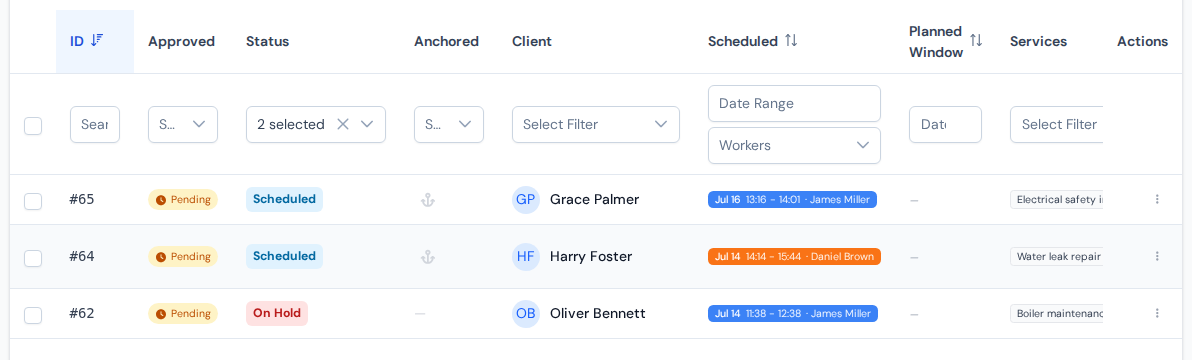
The appointments table with colored status badges in the status column
Every job wears its status as a colored badge you can read at a glance.

You can wrap up a single visit straight from the calendar: click it, set it to "Finished" or "Unfinished", and note how much of each service was actually done, right there on the card. That recorded work is what drives completion. ServisGo marks the whole appointment "Completed" on its own only once a visit is finished and every planned service has been done across the visits, so finishing a visit that covered just part of the plan leaves the job open, with the rest carried to the next visit. The new guide when a job is complete walks through every case.
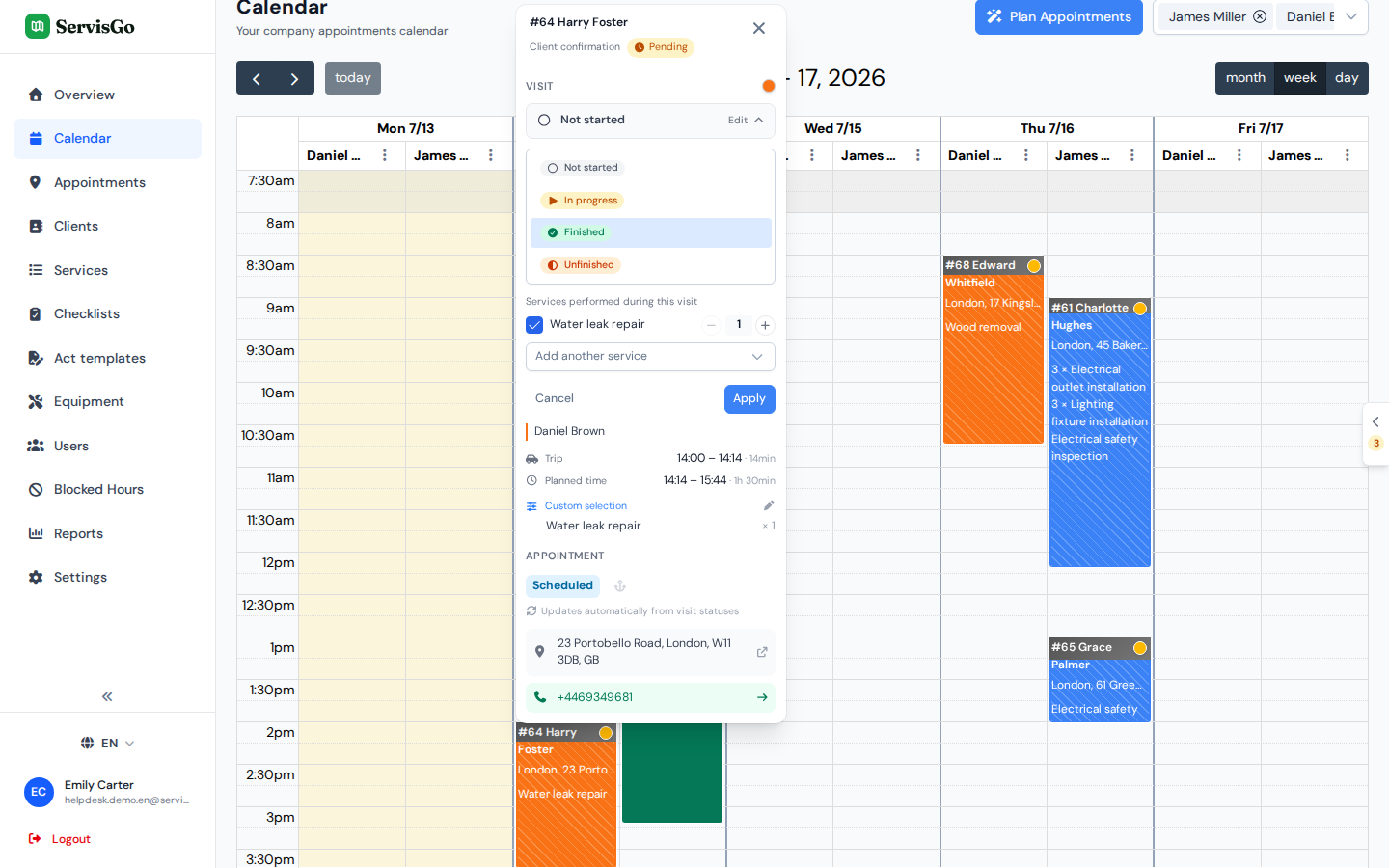
The visit card with the status list open and the Services performed during this visit checklist below it
Finish a visit from the calendar and record what was done in the same place.

Closing a job also tidies the calendar. Its upcoming visits come off the calendar, and the visits that already happened stay exactly as they were: ServisGo no longer marks them finished for you. They simply turn faded to show the job is closed while each keeps its own color, so your calendar stays an honest record of which visits were done and which were not. See visit statuses and recording the work.

Two more touches for the office: the appointments list has new "Total Price" and "Finished at" columns you can switch on from the column settings, and every status change is now saved in the appointment's history.
ServisGo

Field service management software for small and medium service companies.

Product
Scheduling & calendarRoute optimizationRecurring jobsTechnician appChecklistsService reportsClient portal & SMSAll featuresPricing
Industries
CleaningHVACPlumbingElectricalLandscapingPest controlAll industries
Resources
Help centerWhat's newSupport
Company
ContactPrivacy policyTerms of serviceDelete account
© 2025 ServisGo. All rights reserved.