Which services each visit covers
Every work order lists the services your client ordered. When the work fits into a single visit, that is all you need to know. But when a job takes several visits, the important question becomes: what exactly is left to do on the next visit?
ServisGo answers that for you. Every scheduled visit shows what is still left to do, and when a visit should cover something specific, you can pick that yourself.
It starts with the planned services
When you create a work order, you add the services it should cover in the "Planned services" section of the work order form, each with its amount, price and duration. This is the plan: the full list of work the client is expecting.
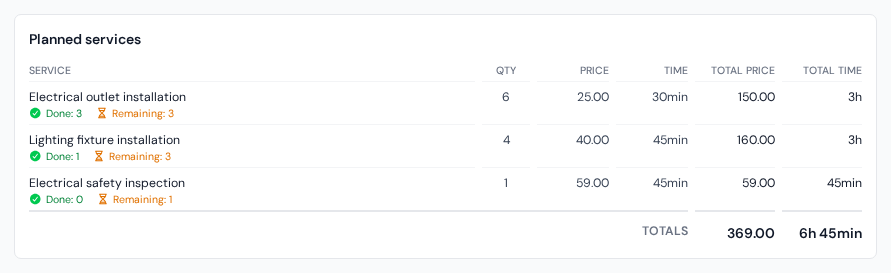
Everything below is based on this list. Visits never change the plan itself. They only keep track of how much of it is done.
What is still left to do
On the "Calendar" page, click a visit block once and a small details card opens next to it. Its service list shows exactly what is still left: the planned amounts, minus everything already done on earlier visits of the same work order.
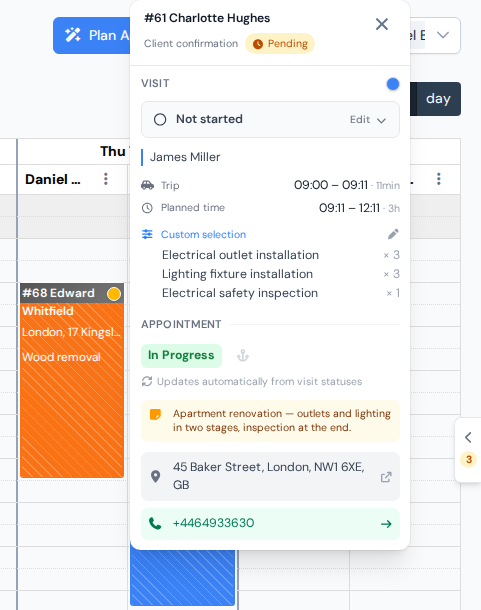
ServisGo keeps this list up to date on its own. If your technician installs two of five planned outlets on Monday, the Tuesday visit automatically shows the remaining three, so nobody has to update anything by hand.
Custom selection: decide what a visit covers
Sometimes the automatic list is not what you want. Maybe the first visit should only handle the inspection, and the installation is saved for a second visit with two technicians. In that case, pick the services for the visit yourself:
- 1Open the visit in the calendar
On the "Calendar" page, click the visit block once (a plain click, not a right-click) so its details card opens.
- 2Click the service list on the card
Click anywhere on the service list, or click the small pencil icon that appears to the right of the blue "Custom selection" label when you move the mouse over it. The list switches to editing and shows every service planned for the work order, each with a checkbox.
- 3Choose the services and amounts for this visit
Tick the checkbox of each service this visit should cover, set the amount with the +/− stepper next to it, and press "Save".
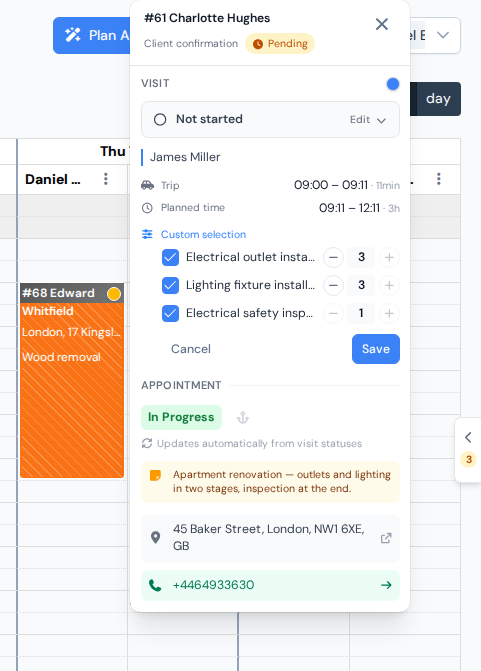
Picking which services (and how many) this one visit should cover.
The service list on the card always sits under the blue "Custom selection" label. When a visit has its own selection, that list shows exactly what you picked, and an automatic "To do" list appears below it for reference, showing everything still open on the whole job.
As work gets done
When your technicians record the work they did on a visit, later visits show that much less to do. The card of the visit also lists the recorded work under "Performed services", each line with a green check mark.
The work order window adds it all up. Open it by right-clicking the visit and picking "View" (or by clicking the work order's number in the "ID" column on the "Work Orders" page): in the "Planned services" box, every line shows a green "Done" and a "Remaining" counter.
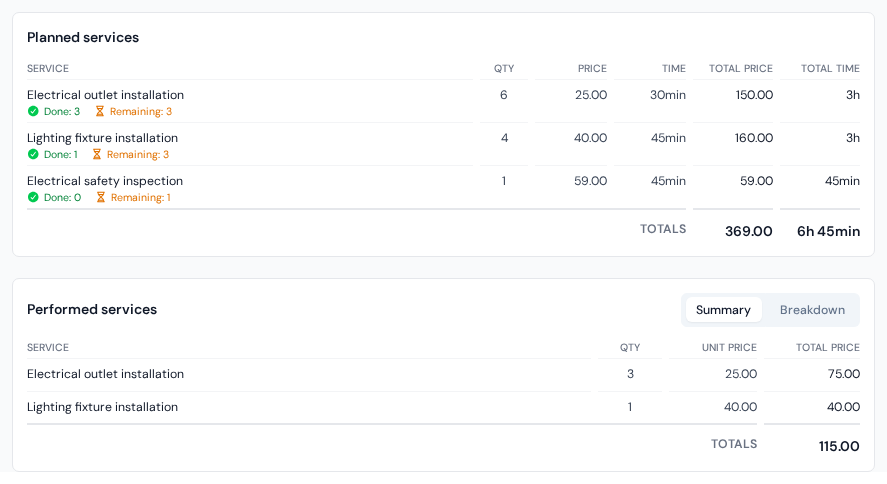
Recording the work itself (amounts, prices, comments) has its own guide.