Smart suggestions that cut driving
Driving time is the silent cost of field work. A work order booked on the wrong side of town can eat an hour of a technician's day before any work starts.
ServisGo plans around that. It knows where every job and every technician is, and when you pick a time for a work order it suggests the options that add the least driving.
Every address goes on the map
Planning starts from knowing where things are. When you enter an address, whether a client's object or a technician's home, you pick it from the list that appears as you type, and the point on the map comes with it: the pin button next to the address turns green. Only addresses with a green pin take part in planning. An address with a red pin has no point yet, so no times are suggested for it and its visits get no driving time.
How time suggestions work
To get time suggestions for a work order, open it for editing, find the "Visits" section at the bottom of the dialog and click "Add visit". The panel that opens starts on its "Suggested times" tab. Behind the scenes, ServisGo looks at each technician's day: where they already are before and after every open gap. The cards then show the times where the new job fits with the least extra driving. Click one to add the visit.
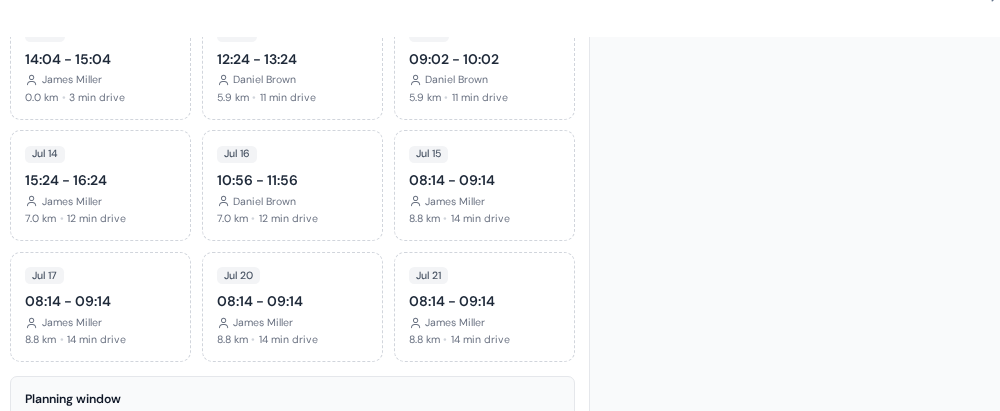
A suggestion is only offered when it truly fits. ServisGo considers:
- Who can do the job: only technicians assigned the work order's services are suggested. See the team guide.
- The work order length: the work has to fit in the gap, travel included.
- The planning window: the date range the work order should be booked in.
- Working hours and blocked time: nothing is suggested outside a technician's bookable day or over their blocked hours.
Travel time on the visit card
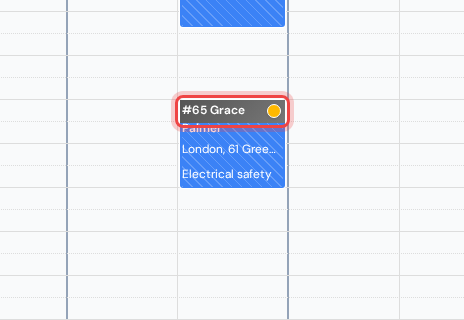
Once a visit is booked, you never calculate its driving time yourself. ServisGo adds it around the visit automatically, based on real road distances. You can see it right in the calendar: the dark strip at the top of each visit block is the drive there. The longer the drive, the taller the strip.
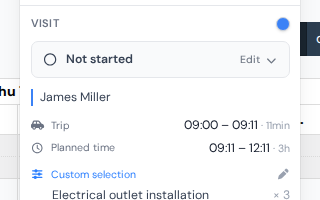
For the exact minutes, click the visit block: the card that opens has a "Trip" row showing when the drive starts and how long it takes. The driving updates automatically whenever you move a visit: drag something to a new time and the strips around it are recalculated.