Plan faster: exact drag times and services in bulk
Two updates land in the dashboard this week, both aimed at planning with fewer clicks and fewer mistakes.
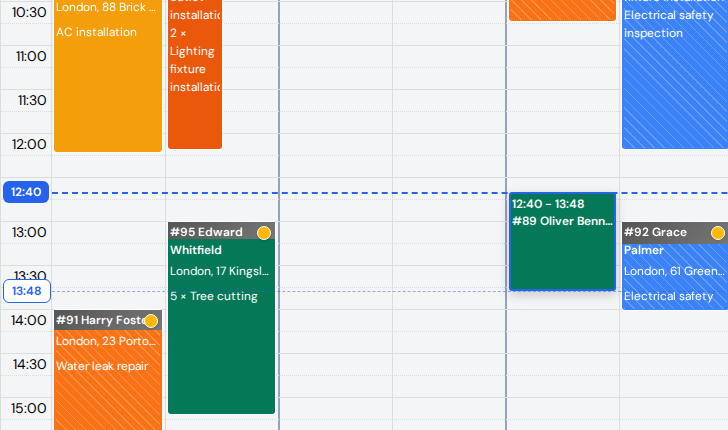
First, the calendar. Rescheduling by drag is quick, but on a wide calendar it was easy to drop a visit ten minutes off. Now the dragged block shows its new start and end times, dashed lines stretch across the grid, and small bubbles on the left time axis show the exact minutes. Resizing works the same way, and so does dragging an appointment in from the waiting list. Details are in the calendar guide.
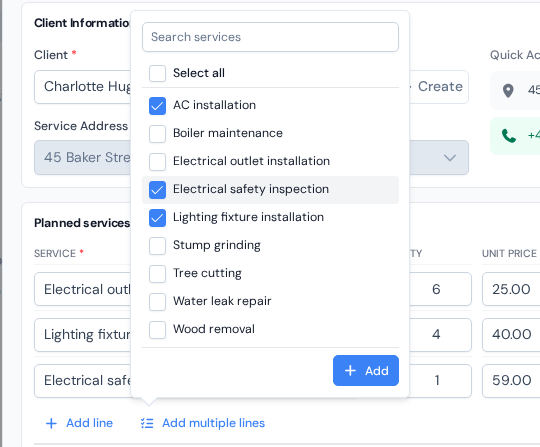
Second, the appointment form. Big jobs used to mean clicking "Add line" over and over. The new "Add multiple lines" button opens your catalog as a list with a search box and checkboxes: tick everything the job needs (or use "Select all") and press "Add". Each service arrives as its own line with the price and duration filled in, and on every line you can now edit either the "Unit price" or the "Total Price"; the other recalculates on its own. The step-by-step is in creating an appointment.